Compare
Bulkvane vs Matrixify
The short answer
Choose Matrixify if you need to create past orders or payouts, for example for a full migration from another platform. Bulkvane supports FTP, FTPS and SFTP file sources on Growth and Pro. Choose Bulkvane if you want a field-by-field preview and one-click undo for 30 days on products, customers, collections, discounts, pages, metaobjects and more, from $12 every 30 days instead of $20.
Side by side
| Feature | Bulkvane | Matrixify |
|---|---|---|
| Free plan | 10 of each data type per job | 10 items per file for each data type |
| Paid plans | Starter $12: 5,000 products · Growth $39: 50,000 · Pro $149: 100,000 per job | Basic $20: 5,000 products · Big $50: 50,000 products · Enterprise $200: unlimited, per file |
| Data types | Products and variants, customers, collections, orders (import: tags, notes, metafields), draft orders, discounts, pages, blog posts, redirects, menus, files, metaobjects, metafield definitions, translations, price lists, B2B companies, gift cards | Products, collections, customers, B2B companies, discounts, orders, draft orders, payouts, pages, blog posts, redirects, menus, files, metaobjects, metafields, translations and more |
| Files | Excel and CSV | Excel and CSV |
| Import from | Upload, Google Sheets, Google Drive, Dropbox or any link | Upload, Google Sheets, Google Drive, Dropbox, FTP/SFTP |
| Before applying | Preview of every field, old value beside new | Dry run: simulates the import and gives a results file |
| Undo an import | One click, for 30 days, for every data type | No one-click undo; restore by re-importing a backup export |
| Spreadsheet editor in Shopify admin | Yes | Not listed |
| Scheduled imports and exports | Daily or weekly, from Starter (5–50 schedules) | Yes |
| AI assistants (MCP) | Yes: Claude, ChatGPT, Cursor; read-only for your store | Yes |
| App languages | English, Spanish, French, German, Brazilian Portuguese | English |
| App Store rating | New (launched October 2026) | 4.9 from 1,777 reviews; Built for Shopify |
Checked on from each app's Shopify App Store page and documentation. Prices are in USD, billed every 30 days. Other apps change, so check their pages before you decide, and tell us if something here is out of date.
When Matrixify is the better choice
- You need to create past orders or work with payouts. Bulkvane only changes tags, notes and metafields of existing orders.
- You're migrating a whole store from another platform.
- You want to pick up files from FTP/SFTP, or run jobs more often than daily.
- You want an app with years of reviews behind it. Matrixify launched in 2017.
When Bulkvane is the better choice
- You want to see every changed field before anything is saved, for products, customers, discounts, pages, metaobjects or any other type: preview.
- You want to take an import back in one click if something looks wrong, for 30 days: undo.
- You'd rather edit products in a grid inside Shopify admin than download a file: spreadsheet editor.
- Your team works in Spanish, French, German or Brazilian Portuguese.
- 5,000 products per job is enough, and you'd like to pay $12 rather than $20 every 30 days.
What each plan includes, type by type
Both apps give every plan every data type and limit how many items one job (Bulkvane) or one file (Matrixify) can hold. At the two most common price points:
| Per job / per file | Bulkvane Starter $12 | Matrixify Basic $20 | Bulkvane Growth $39 | Matrixify Big $50 |
|---|---|---|---|---|
| Products | 5,000 | 5,000 | 50,000 | 50,000 |
| Customers | 5,000 | 2,000 | 50,000 | 20,000 |
| Collections | 5,000 | 300 | 50,000 | 3,000 |
| Orders and draft orders | 1,000 | 1,000 | 10,000 | 10,000 |
| Discounts | 500 | 300 | 5,000 | 3,000 |
| Pages / blog posts | 100 / 100 | 50 / 50 | 1,000 / 1,000 | 500 / 500 |
| Metaobjects | 1,000 | 50 | 10,000 | 500 |
| B2B companies | 500 | 50 | 5,000 | 500 |
| Redirects | 10,000 | 10,000 | 100,000 | 100,000 |
| Files | 5,000 | 10,000 | 50,000 | 100,000 |
| Translations | 5,000 | 10,000 | 50,000 | 100,000 |
Preview vs dry run
Both apps let you see what an import would do before you run it, in different ways.
- Matrixify's dry run simulates the import and gives you a results file: which rows would be created, updated or fail.
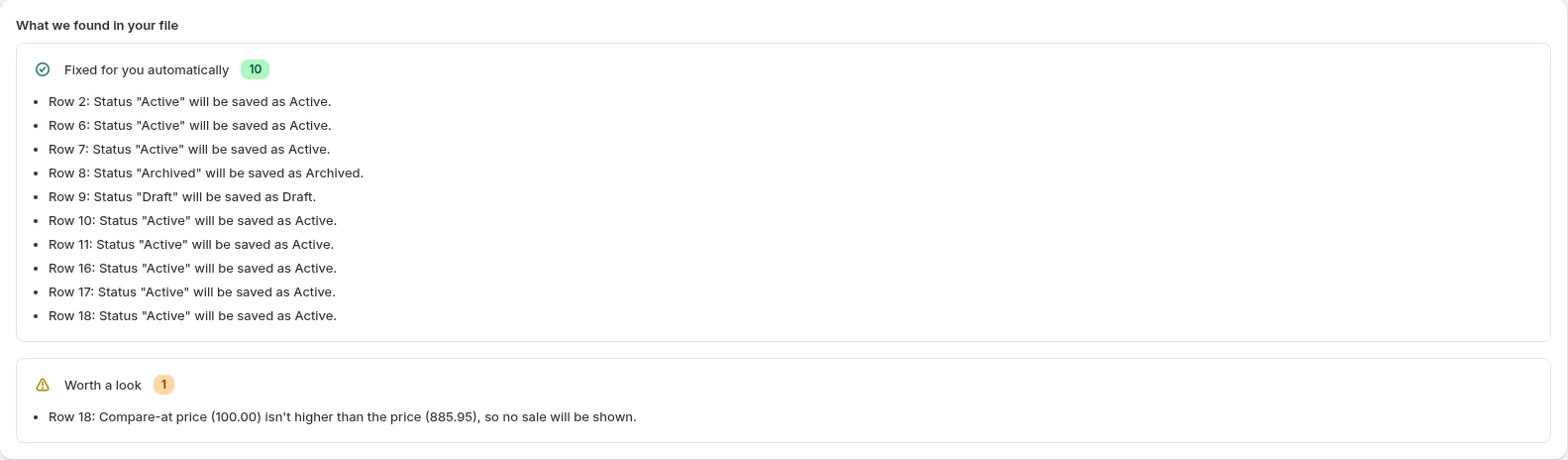
- Bulkvane's preview lists every field that will change on every item, old value beside new, on screen. Problems are explained by row in plain words, and common ones (a decimal comma, a currency symbol, an ID Excel rounded to 7.2E+12) are fixed or flagged before you apply.
Undo vs restoring a backup
This is the biggest difference. Matrixify's listing doesn't mention a one-click undo: to reverse an import, you re-import a backup export you made before it. That works, if you remembered the backup and it has every column the import touched.
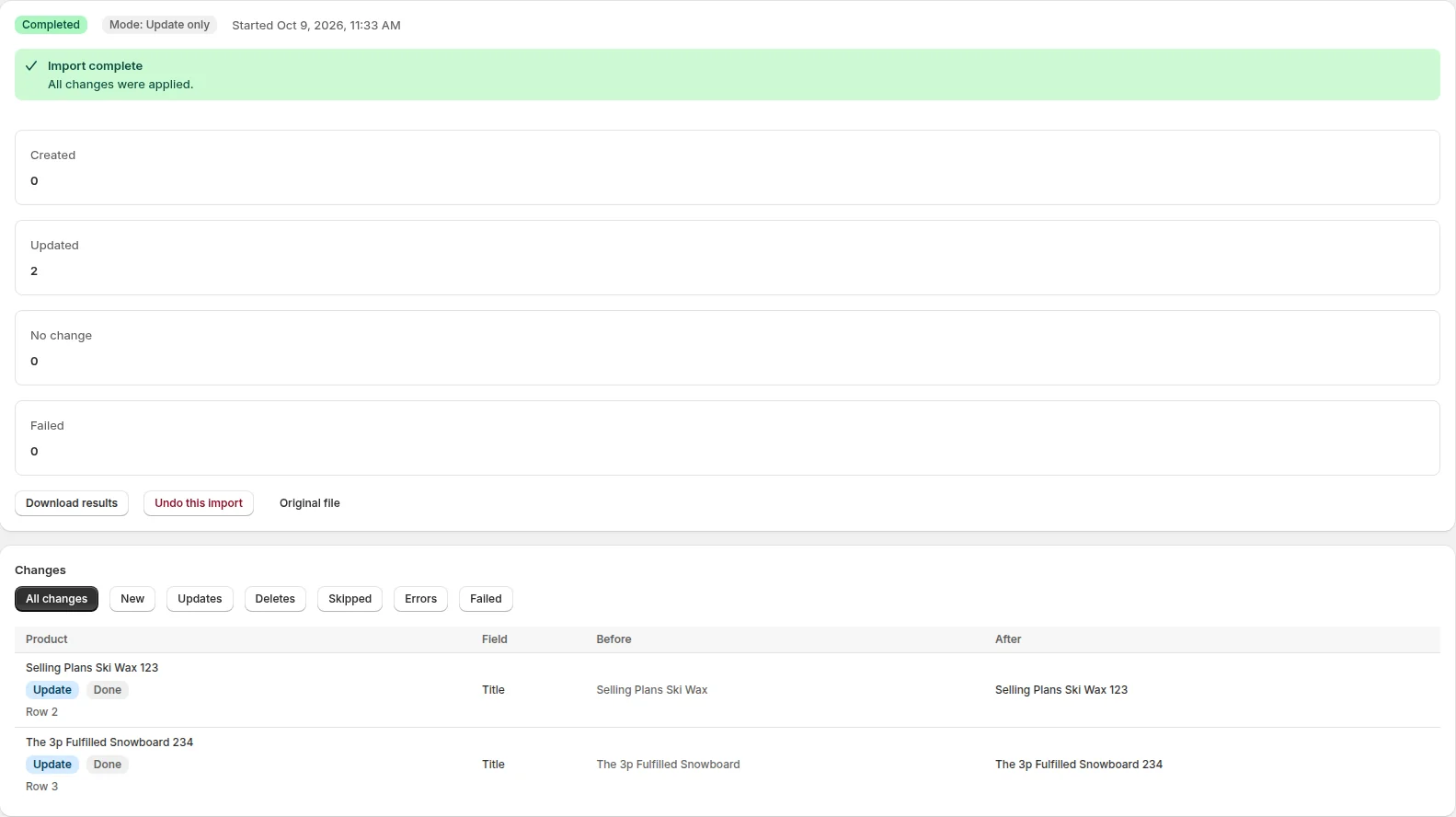
Bulkvane saves a snapshot of every item before it changes anything. For 30 days, Undo this import on the job page restores the fields the import changed, deletes what it created and re-creates what it deleted, for every data type, on every plan. See undo an import.
Migrations and automation
Matrixify is built for moving whole stores: its listing names migrations from Magento, WooCommerce, BigCommerce, Lightspeed and WordPress, it can create past orders and works with payouts, and it runs scheduled and repeating jobs from FTP/SFTP, Dropbox or Google Drive. Bulkvane doesn't migrate other platforms, create past orders or read FTP; its schedules run exports and link imports daily or weekly. If that's your job, Matrixify is the better tool.
Bulkvane is built for the edits you make every week on a live store (prices, stock, tags, SEO, metafields, discounts, pages), where seeing each change first and being able to take it back matter more than automation. It also has a spreadsheet editor inside Shopify admin for edits without a file.
Using Matrixify files in Bulkvane
Excel workbooks with a sheet per data type, like a Matrixify export, are imported sheet by sheet, including sheets named Smart Collections and Custom Collections. Each sheet becomes its own job with its own preview, so you see exactly what Bulkvane will do with your file before anything changes. See several data types in one file.
- Export from Matrixify as usual, or take a recent export you already have.
- In Bulkvane, open Import and add the workbook. Each recognised sheet becomes its own job.
- Check each preview. Columns Bulkvane doesn't use are listed and ignored, so nothing changes by surprise.
- Apply the sheets you're happy with. Each one can be undone on its own for 30 days.
Sources
- Matrixify on the Shopify App Store
- Matrixify tutorial: dry run imports
- Matrixify: Excelify name changes to Matrixify
- Bulkvane on the Shopify App Store
Product names are trademarks of their owners and are used only to identify them. Bulkvane isn't affiliated with them.
Is Bulkvane a good Matrixify alternative?
For most stores, yes: it imports and exports products, customers, collections, orders, discounts, pages, redirects, metaobjects, translations, gift cards and more with Excel and CSV, shows every change before it's applied and can undo an import for 30 days. For creating past orders, FTP or full migrations from another platform, Matrixify does more.
Can Bulkvane import files exported by Matrixify?
Excel workbooks with a sheet per data type, as Matrixify exports them, are imported sheet by sheet, including Smart Collections and Custom Collections sheets. The preview shows what will change before you apply anything.
Is Bulkvane cheaper than Matrixify?
Bulkvane Starter is $12 every 30 days for up to 5,000 products per job, Growth $39 for 50,000 and Pro $149 for 100,000, with their own limits for other data types. Matrixify's Basic plan is $20 every 30 days for up to 5,000 products per file, Big $50 for 50,000. Both have a free plan for 10 items of each type.
Is there a free Matrixify alternative?
Bulkvane has a free plan for 10 of each data type per job, with the same preview and 30-day undo as paid plans. That's enough to try it on a few products, orders or pages. Matrixify also has a free plan for 10 items per file. For more, Bulkvane Starter is $12 every 30 days.
Is Excelify the same as Matrixify?
Yes. Excelify was renamed Matrixify; the app and its developer are the same.
How much does Excelify (Matrixify) cost?
On its Shopify App Store listing (checked 18 October 2026), Matrixify, formerly Excelify, has a free plan for 10 items per file, Basic at $20 every 30 days for 5,000 products per file, Big at $50 for 50,000 and Enterprise at $200 with no limit. Bulkvane is $12, $39 and $149 for 5,000, 50,000 and 100,000 products per job.
Can Matrixify undo an import?
Matrixify can do a dry run, which simulates an import without changing your store. Its App Store page doesn't list a one-click undo, so after a real import you restore data by re-importing a backup. Bulkvane saves a snapshot before every import and can undo it in one click for 30 days.
Does Bulkvane do store migrations like Matrixify?
No. Bulkvane doesn't migrate from other platforms or create past orders. It's built for importing, exporting and editing data in a Shopify store you already run.
Which is better for metaobjects and custom data?
Both import and export metaobjects and their definitions. Per job or file, Bulkvane Starter allows 1,000 metaobjects and Matrixify Basic 50; Matrixify's metafields are unlimited on every plan.
Try Bulkvane free. Undo is always one click away.
Install from the Shopify App Store in under a minute. Free plan for 10 of each data type per job; paid plans from $12 a month.
Preview every change.Undo any import for 30 days.
Install free