Best Shopify bulk edit apps in 2026 (honest comparison)
Bulkvane, Matrixify, Hextom, Ablestar, Altera, Setary and Shopify's own tools compared on price, free plan, undo, Excel and scheduling, with sources.
Before you read: we make Bulkvane
This comparison is written by the team behind Bulkvane. We've tried to be fair: every fact about another app comes from its Shopify App Store listing, checked on 18 October 2026, and each app gets the same template, including where it beats ours. Prices change, so follow the source links before you decide, and tell us if something here is out of date.
The short list
| App | Best for | Free plan | Paid from | Undo | Scheduling | Rating |
|---|---|---|---|---|---|---|
| Matrixify | Migrations and every data type | 10 items per file per type | $20 | Not listed (dry run) | Yes | 4.9 (1,777) |
| Ablestar | Rule-based and recurring edits | 10 products | $30 | One click; 60–180-day history | Yes, paid plans | 4.9 (927) |
| Hextom | Low-cost edits and scheduled tasks | 10 products per task | $9.99 (500 products) | Revert; 30–180-day backups | From $19.99 | 4.9 (1,166) |
| Altera | Free imports and FTP/SFTP automation | 100 rows per file | $15 | Rollback listed | Yes, $15 plan | 5.0 (257) |
| Setary | Spreadsheet-style product editing | No (7-day trial) | $9.99, no product limits | Before saving | Not listed | No reviews yet |
| Bulkvane | Imports you can preview and undo; scheduled sales | 10 of each type per job | $12 (5,000 products) | One click, 30 days | Yes, from $12 | No reviews yet |
| Shopify built-in | Small edits and occasional CSVs | Free | — | No | No | — |
How we compared
- Recovery: can you see changes before they're saved, and take them back afterwards?
- Price for a real job: the plan you'd need for 5,000 products, not just the free tier.
- Files: Excel as well as CSV, and imports from Google Sheets, Drive, Dropbox or FTP.
- Breadth: products only, or customers, collections, orders and the rest of the store too?
- Automation: scheduled or recurring jobs.
- Track record: App Store rating, number of reviews and how long the app has been around.
Matrixify
- Price: Free; Basic $20 (5,000 products per file); Big $50 (50,000); Enterprise $200 (unlimited).
- Free plan: 10 items of each data type per file.
- Best for: store migrations, very large catalogs and scheduled imports or exports.
- Pros: covers almost every Shopify data type, including payouts and store credits; Excel, CSV and Google Sheets; FTP/SFTP, Dropbox and Google Drive; scheduled jobs; an MCP server for AI agents; on the App Store since 2017 with 1,777 reviews; Built for Shopify.
- Cons: its listing mentions a dry run but no one-click undo, so a wrong import is reversed by re-importing a backup; English only; per-file limits for some types are low on Basic (for example 300 collections).
Ablestar Bulk Product Editor
- Price: Free; Basic $30; Advanced $60; Professional $120; unlimited products per task on paid plans.
- Free plan: edits, exports and imports of up to 10 products.
- Best for: rule-based edits (filter products, then change prices, tags, text or metafields) and scheduled or recurring edits.
- Pros: old and new values before a change runs; one-click undo with 60 to 180 days of history on paid plans; scheduled sales that revert automatically; supplier inventory sync from FTP, Drive, Dropbox or a URL; automatic product rules; Built for Shopify.
- Cons: focused on products; the cheapest paid plan is $30; English only.
Hextom: Bulk Product Edit
- Price: Free; Basic $9.99 (500 products per task); Professional $19.99 (5,000); Advanced $49.99 (50,000).
- Free plan: 10 products per task.
- Best for: low-cost bulk edits of products, prices, tags and inventory, and scheduled tasks.
- Pros: the cheapest paid plan here for small catalogs; revert any product edit, with backups kept 30 to 180 days by plan; scheduled tasks from Professional; on the App Store since 2015 with 1,166 reviews.
- Cons: CSV only, as its listing doesn't mention Excel; no field-by-field preview listed; English only.
Altera: Export and Import
- Price: Community (free); Developer (free for stores on non-paying Shopify plans); Pro $15.
- Free plan: 100 rows per file, one job at a time.
- Best for: free or low-cost imports and exports, Matrixify-format files, and automation through Google Sheets, SFTP, WebDAV or FTP.
- Pros: reads Matrixify Excel and CSV files as they are; products, orders, customers, metaobjects, translations and more; scheduled jobs on Pro; an MCP server and command-line tool; migration from WooCommerce, Magento and Etsy; 5.0 from 257 reviews; Built for Shopify.
- Cons: on the App Store since February 2025, so a shorter track record; its listing names Rollback and Backup but doesn't say how they work; no preview described; English only.
Setary Bulk Spreadsheet Editor
- Price: Starter $9.99 every 30 days, or $99 a year.
- Free plan: none; a 7-day free trial.
- Best for: editing products, variants, metafields and stock by location in a live spreadsheet-style grid.
- Pros: no product limits; bulk set, clear, append and replace, and price changes by percentage or amount; preview and undo before you save; manages products across several Shopify or WooCommerce stores.
- Cons: launched in June 2026 with no reviews yet; products only; no free plan; English only.
Bulkvane
- Price: Free; Starter $12 (5,000 products per job); Growth $39 (50,000); Pro $149 (100,000).
- Free plan: 10 of each data type per job, with the same preview and undo as paid plans.
- Best for: imports and edits you want to check field by field before they're saved, and be able to take back.
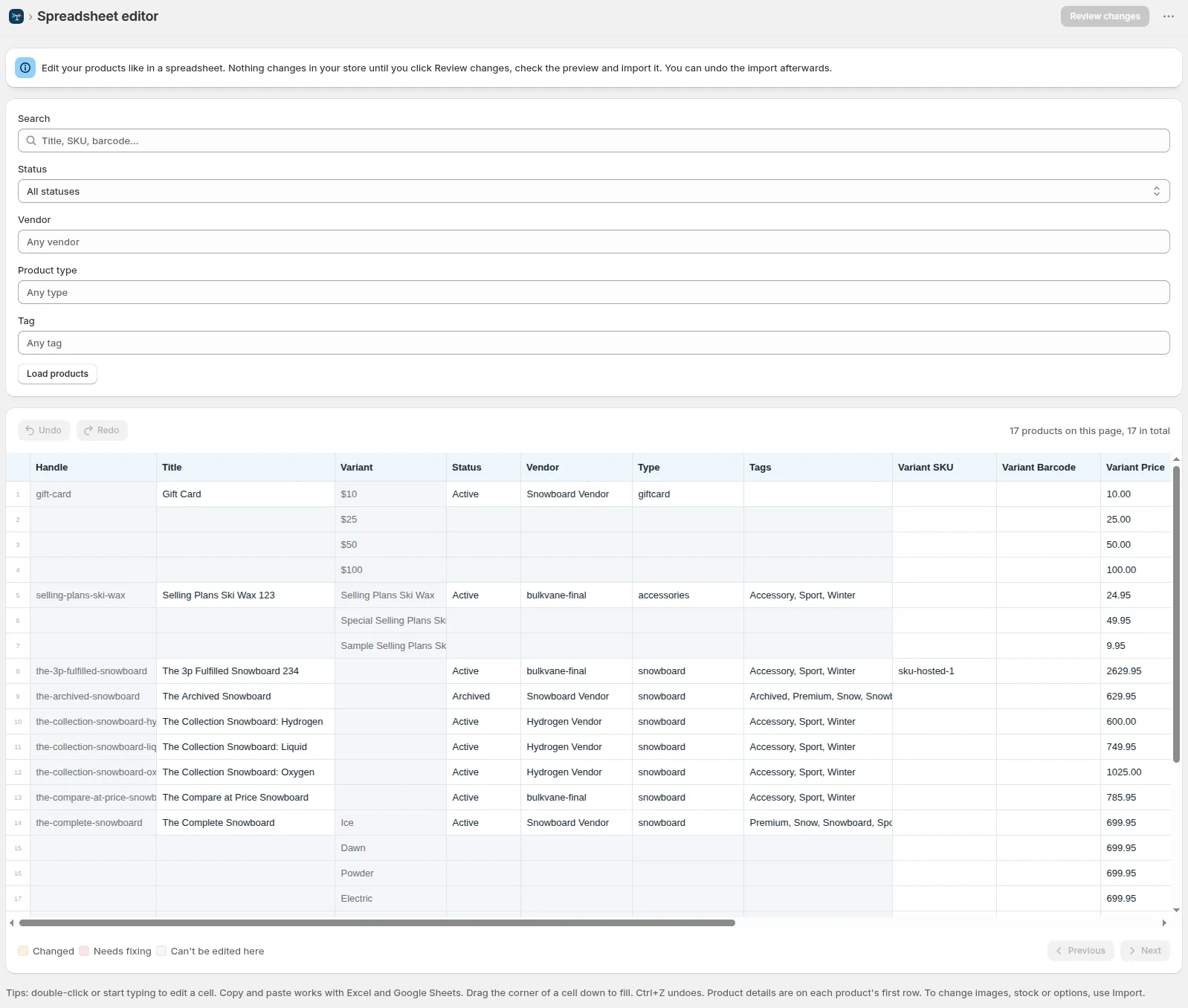
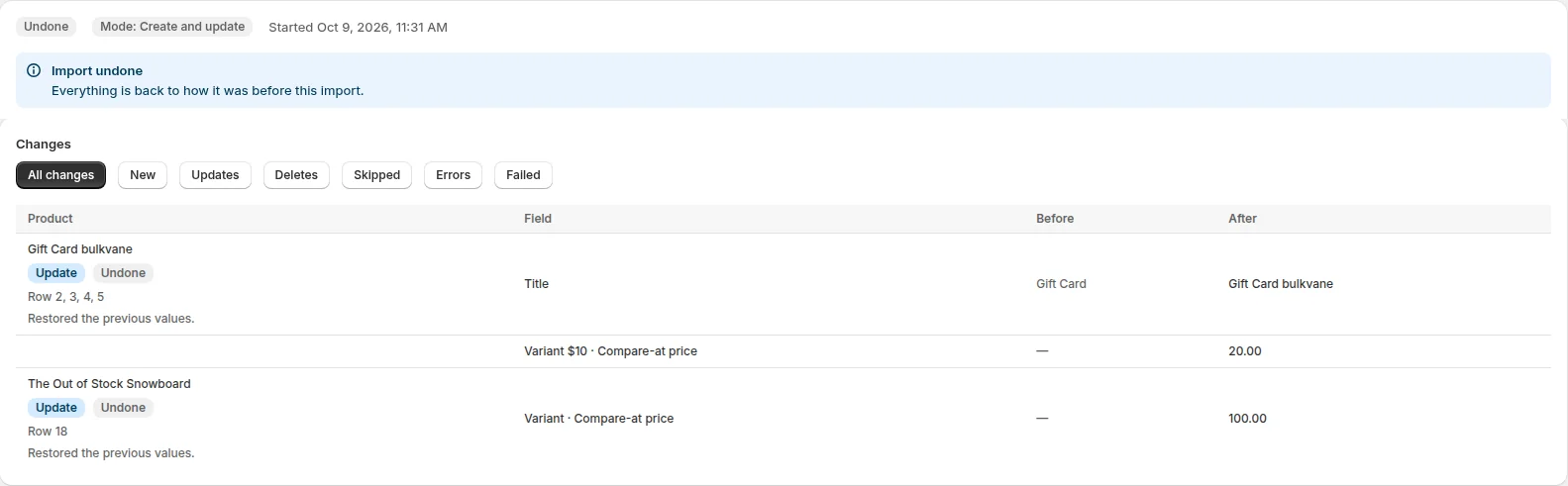
- Pros: every changed field old beside new before you apply; one-click undo for 30 days, re-creating deleted items too; Excel, CSV, Google Sheets, Drive and Dropbox links; 18 data types, from products and customers to discounts, metaobjects and gift cards; a risk check for zero prices and big price drops; price rules and sales that restore prices when they end, and daily or weekly scheduled jobs, from Starter; a spreadsheet editor inside Shopify admin; an MCP server for Claude, ChatGPT and Cursor; the app in five languages.
- Cons: launched in October 2026 with no reviews yet; no FTP or supplier inventory sync; doesn't create past orders (order imports change tags, notes and metafields).
Shopify's built-in tools
- Price: free.
- Best for: a few dozen products in the admin bulk editor, or an occasional product CSV.
- Pros: nothing to install; the bulk editor works on products, collections, inventory and customers.
- Cons: no undo; a CSV import can't be cancelled once it starts and keeps no history; CSV only, up to 15 MB; blank cells overwrite values when you update products.
Step-by-step instructions for all three methods are in how to bulk edit Shopify products.
Which one should you pick?
- Migrating a whole store, or need payouts and scheduled FTP jobs: Matrixify, or Altera if budget matters most.
- Edits that repeat on a schedule, or rules that run by themselves: Ablestar.
- A small catalog and the lowest price: Hextom's Basic plan.
- You like editing in a grid and don't need other data types: Setary.
- You import spreadsheets of products, customers, collections and more, want a preview and an undo, or want sales that end by themselves: Bulkvane.
Whichever you choose, try it on its free plan or trial with five products before you trust it with your whole catalog.
Frequently asked questions
What is the best bulk edit app for Shopify?
It depends on the job. Matrixify is the most complete, Ablestar and Hextom are strong for rule-based and scheduled product edits, Setary is a spreadsheet-style editor, and Bulkvane is built for imports you can preview and undo, with scheduled sales. Shopify's own bulk editor is enough for small changes.
Which Shopify bulk edit apps have an undo?
Bulkvane undoes any import in one click for 30 days. Ablestar lists one-click undo with 60 to 180 days of history on paid plans, Hextom a revert with 30 to 180 days of backups, and Setary undo before you save. Altera lists Rollback. Matrixify's listing doesn't mention one, and Shopify's own tools have none.
Is there a free Shopify bulk edit app?
Matrixify, Ablestar, Hextom and Bulkvane have free plans of about 10 items, and Altera's free plan allows 100 rows per file. Shopify's bulk editor and CSV import are free with no item limit, but have no undo.
Which bulk edit apps work with Excel files?
Matrixify, Ablestar, Altera and Bulkvane take Excel files. Hextom's listing mentions CSV. Shopify's own importer only takes CSV.
Are these ratings and prices current?
They were checked on each app's Shopify App Store listing on 18 October 2026. Apps change their plans, so follow the links on our comparison pages before you decide.
Related guides
How to bulk edit products in Shopify (2026 guide, 3 methods)
Bulk edit Shopify product data three ways (the admin bulk editor, a CSV import or an app), with steps for prices, tags, SEO, metafields, variants and stock.
· 14 min read
Can you undo a bulk edit in Shopify? What works and what doesn't
Shopify's bulk editor and CSV import have no undo. How to recover from a bad bulk edit with a backup, and how to make future imports undoable in one click.
· 3 min read
How to bulk edit prices in Shopify (and put them back)
Four ways to change many Shopify prices at once, how to schedule a sale with compare-at prices, and how to undo a price change that went wrong.
· 4 min read
How to bulk edit Shopify productsFree CSV templatesBrowse the help center
Preview every change.Undo any import for 30 days.
Install free